
Attach files to a message and get the agent’s files back
Beta 41 shipped on 26 October 2026, bringing two-way file sharing to OffiAI. You can now attach files directly to your messages and collect the files your agents create.
Sending files to an agent
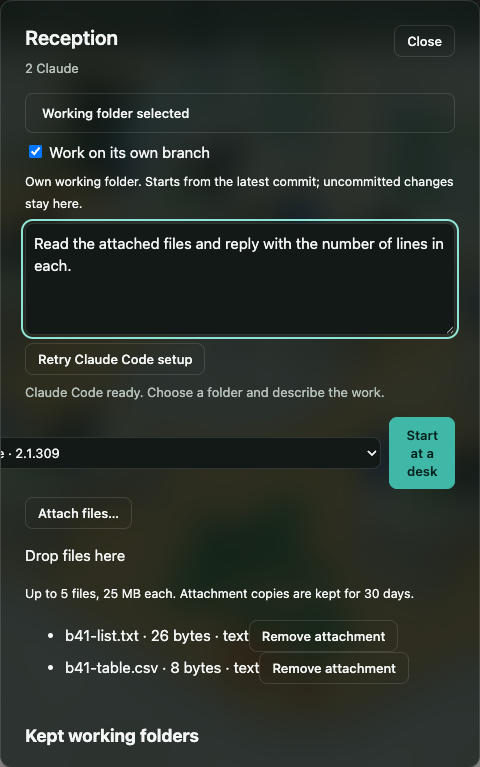
In New task (Reception) and in a desk’s message box, you can choose “Attach files…” or drop files onto the box. You can include up to five files of up to 25 MB each per message. If you want to remove a file before sending, click its chip.
When you send your message, OffiAI copies the files into the task’s own working folder so the agent can read them. Your original files stay where they are. If an original file has a macOS download warning, the copy keeps it. Claude Code, Codex, and Gemini receive the attached files by name.
Getting files back
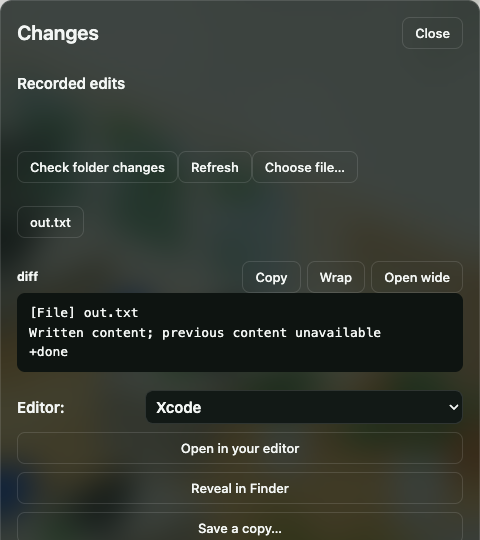
In Changes, you can use “Save a copy…” to keep a file the agent wrote, “Reveal in Finder” to see it on your Mac, or “Choose file…” to pick any other file from the task’s folder.
The drawer also includes an Outbox list. Choosing “Ask for files in Outbox” adds a request to your draft so the agent puts finished files there. Click “Refresh” to see what arrived.
OffiAI keeps attachment copies for 30 days.
Current limits
Attaching a file does not guarantee the agent understands its format. In addition, Cowork cannot receive files from OffiAI yet and says so.
In pictures
Want to try it? Join the preview.