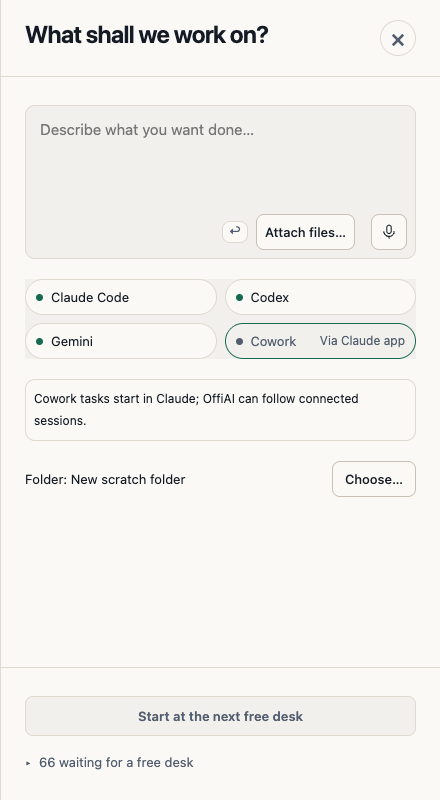
Clicking a desk opens a short Reception
From Beta 81, released on 3 November 2026, Reception is short. You say what you want, pick an agent and press Start.
How to use it
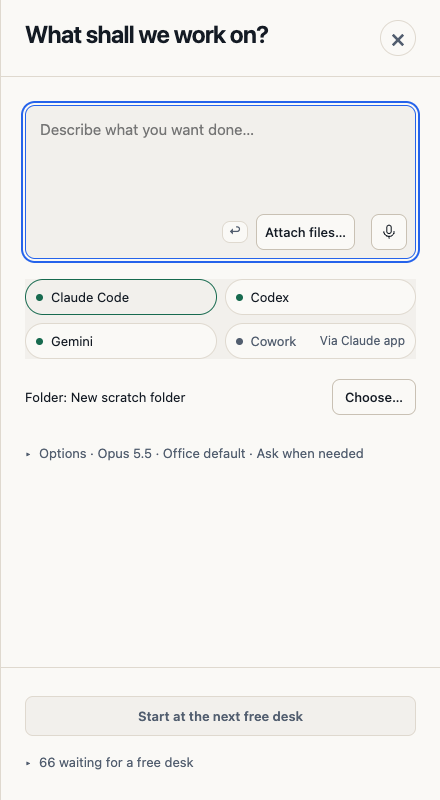
Click a free desk or New task. Reception opens at the top with the cursor already in the brief, so you can start typing. Inside the brief box, a small key symbol such as ↩ shows which key sends, next to Attach files and Voice.
Pick one of four agents: Claude Code, Codex, Gemini or Cowork. An agent that cannot start from here is dimmed with a short tag, for example Via Claude app for Cowork. If you select it, one note under the buttons tells you why.
Your work goes into a new scratch folder unless you press Choose… and pick one. The model and the permissions sit behind one closed Options line that shows your current choice. Open it when you want to change them.
Then press Start at the next free desk. It stays disabled until you write a brief.
What is gone
The suggestion buttons, the extra explanations and the temporary folder path no longer appear. Copy folder path has moved to the task view, under Details.
Current limit
If your office still lists kept working folders from earlier tasks, that list appears inside Reception, and you have to scroll to reach Start.
Want to try it? Join the preview.
In pictures