
Codex and Gemini desks say when a screen looks unfamiliar
In beta 83, a Codex or Gemini desk no longer looks busy while its terminal shows a screen OffiAI does not recognise. The desk says so and offers a way forward.
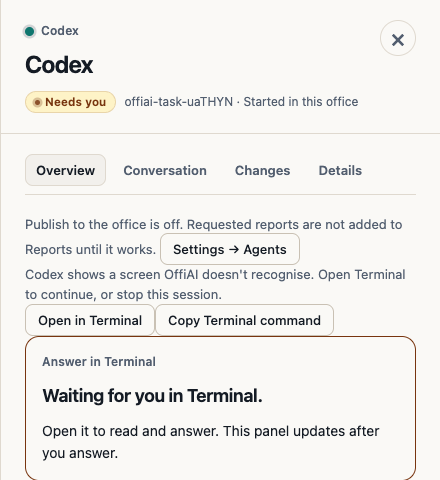
What changed
OffiAI reads the Codex and Gemini terminal screen to know when the agent is ready for your message. Sometimes the agent shows something OffiAI has not seen before, such as a new menu after an update. Before beta 83, the desk could then sit there looking busy, with no hint that it was waiting on that screen.
Now, if the screen is still unfamiliar after OffiAI’s usual eight-second wait, the desk shows: “Codex shows a screen OffiAI doesn’t recognise. Open Terminal to continue, or stop this session.” The same message appears for Gemini. If the screen changes back to one OffiAI knows, the message goes away by itself.
OffiAI never presses Enter blindly into a screen it does not recognise, and it keeps your brief instead of resending one that may already have been delivered.
How to use it
When you see the message, click Open in Terminal, look at what Codex or Gemini is asking and answer it there. Then come back to OffiAI. If you would rather not continue, click Stop. Your files are kept.
Honest limit
OffiAI only tells you about the unfamiliar screen. It does not answer it for you.
Want to try it? Join the preview.