
The message box now shows how to send
OffiAI beta 55 is out, dated 30 October 2026. It brings two small changes to everyday work: every desktop message box shows its current send shortcut without hovering, and Reception invites the work without asking you for a folder.
What changed
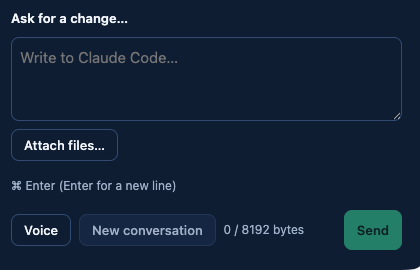
The send shortcut you chose is now written in the message box itself. You no longer need to rest the pointer on anything to find out whether Enter sends the message or adds a new line.
The hint uses the same words as the option you picked. With the first option it reads “Enter (Shift+Enter for a new line)”. With the second it reads “⌘ Enter (Enter for a new line)”. On desktops other than a Mac, Ctrl takes the place of ⌘.
Reception has a new ready line. Instead of asking for a folder, it asks for the work. With Claude Code selected it reads “Claude Code ready. Describe the work.” Codex and Gemini have matching lines. For Claude Code, this line also replaces the separate setup readiness message.
Both changes are translated. In Spanish the Claude Code line reads “Claude Code está listo. Describe el trabajo.”, and in German “Claude Code ist bereit. Beschreibe die Arbeit.”
How to use it
1. Look at any message box on the desktop to see which shortcut sends. 2. To switch, open Settings › General and pick an option under “Send messages with”. The hint in the message box follows the option you pick. 3. Open Reception, read the ready line for your agent, then describe the work you want done.
Limits
The two send options are the ones that already existed; this release only makes the current one visible. The ready lines change what Reception says, not which agents are available on your Mac.
Want to try it? Join the preview.