First run: install to a working agent desk in under two minutes
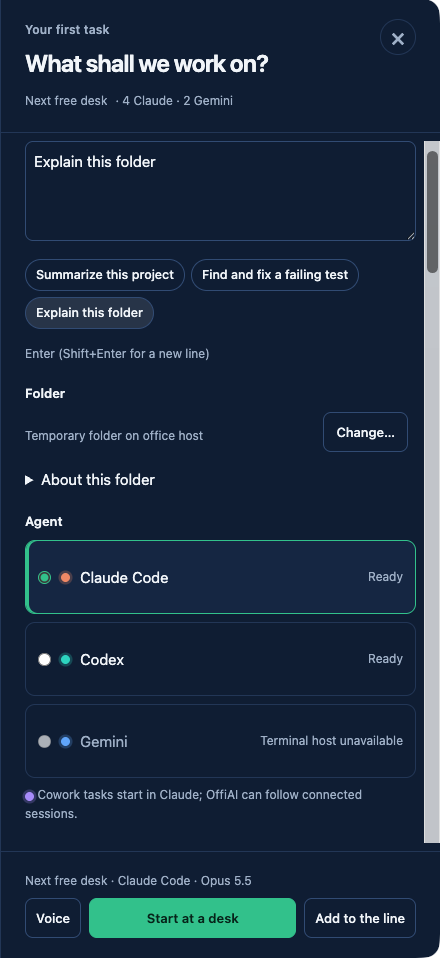
Beta 62 lets you give your first agent a desk in under two minutes with Claude Code or Codex already installed and signed in. Choose a folder, describe the task and watch it start in your office.
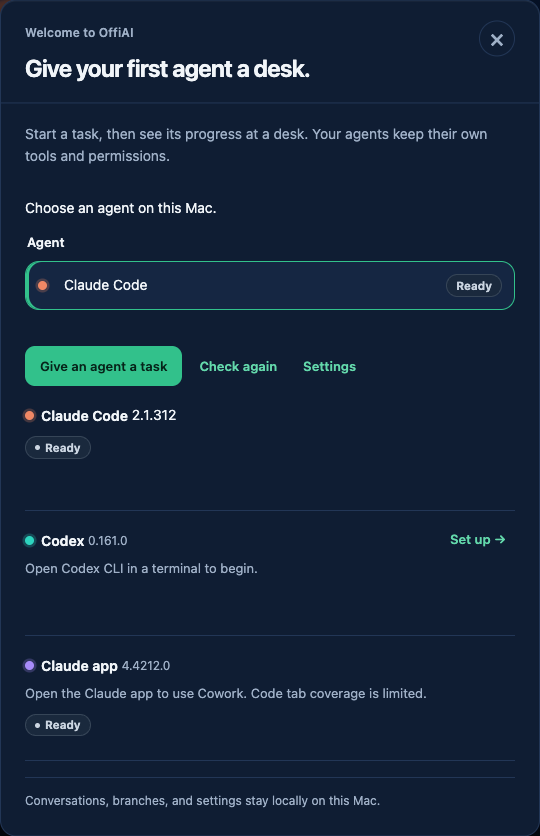
When you launch OffiAI on your Mac, the Welcome screen checks for a ready agent under a 15 s deadline. Ready needs an installed version, selected-profile auth and a task host. Absent, signed-out, unsupported, failed or timeout, and host-unavailable states stay distinct. The Welcome screen selects a ready agent, with Claude preferred. If you use a non-default profile, the sign-in command is scoped to that profile and quoted for your host. If your agent is not ready, Welcome shows one agent’s copyable repair command with Terminal guidance in English, Spanish, or German. The command copies only when you click it, and you can click Check again or choose a different agent.
The Welcome’s agent opens New task with the effective folder, with no Settings detour. Describe your task and click Start. The app keeps Starting…, accepted (“Started at desk N”), and working desk activity distinct. A second Start sends nothing. If a start fails or you cancel an override, the app keeps your task, agent and folder. You can press Escape to go back to New task.
The Welcome screen and desk counts no longer contradict each other. The Welcome screen, the empty line, and desk placing now share the same occupancy count for every robot and work report, Desk 5 included. If you follow your office from your phone, the view reads the host and says Reconnecting while offline. If a connection epoch is replaced or a visitor is denied access, the view never shows “No sessions yet” or install advice.
One honest limit is that there is no saved default.
Want to try it? Join the preview.
In pictures