Beta 76: If OffiAI Cannot Open
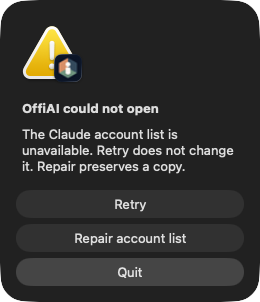
OffiAI beta 76 arrived on 1 November 2026 with visible startup recovery. If OffiAI cannot open, it explains the problem and lets you retry or quit, while keeping a copy of your saved accounts.
What changed for you
Previously, an unreadable account list or a failed window load could result in a blank window. In beta 76, startup and window failures are caught visibly. If the app cannot open, it presents an explanation of the problem. When an account list is damaged or missing your selected account, repair keeps a copy of the damaged account list instead of discarding your data.
How to use it
You do not need to configure anything. If OffiAI encounters a startup or window load problem:
- Look at the explanation on screen to see what happened.
- Click Retry to try opening the window again.
- Click Quit to close the application.
- If you repair your accounts, choose which account to reconnect. OffiAI never chooses a different account for you.
What it does not do yet
A registry failure visibly blocks Claude work until you repair it. The repair process requires an explicit account choice and cannot reconnect an account on its own. Your Claude sessions remain blocked until you choose which account to use.
Want to try it? Join the preview.
In pictures