Agent install and sign-in from the app: what beta 94 changes
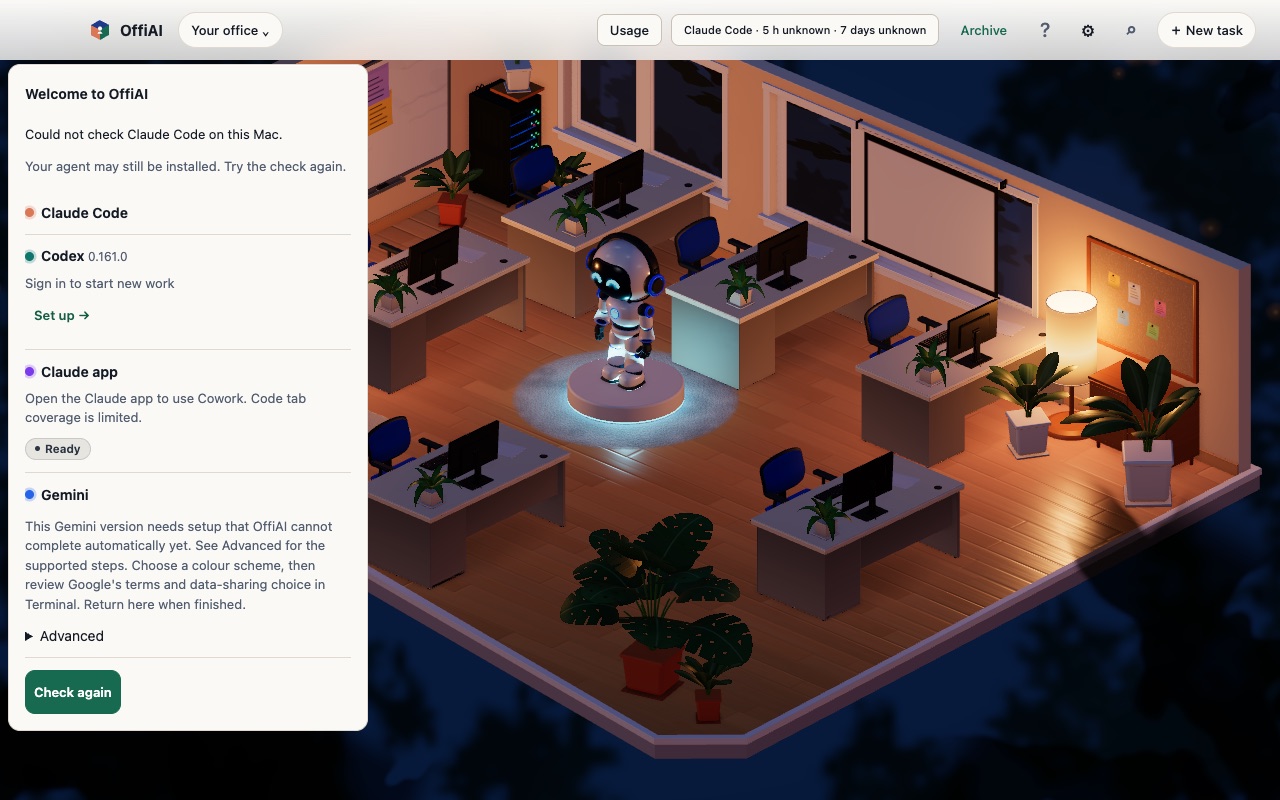
Beta 94, released on 9 November 2026, adds a way to install coding agents and sign in from inside OffiAI instead of in Terminal. In our own hand check of this build, live install and sign-in are not yet confirmed, and “Check again” is still on the Welcome screen.
What changed
The goal is that you no longer need Terminal to set up an agent. An explicit Install is meant to install your agent and start the browser sign-in for that agent once. If an agent is already installed, it should need one Sign in click. Account consent stays in the provider’s browser.
On the welcome card, a signed-out Codex row names Codex with “Sign in to start new work”, never Claude Code. A signed-out Claude Code row names Claude Code.
A validated sign-in is designed to open the browser once per attempt and to recover if the browser fails to open. Device codes go to the browser, and callback flows never ask you to paste a code. Install phases and classified failures never show you raw process output.
How to use it
When you open OffiAI, look at the welcome card:
- Click Install on the agent you want. This authorizes the install and the browser sign-in that follows for that agent.
- If the agent is already installed, click Sign in.
- Finish account consent in your browser.
What it does not do yet
In our hand check of beta 94, we could not qualify live install and sign-in, because we had no authorized test environment. So we cannot yet confirm that the steps above work end to end. “Check again” is also still on Welcome, so you may still see it and need to press it.
Want to try it? Join the preview.
In pictures