
Why AI coding agents need an office
One AI coding agent in one terminal is easy to follow. Four of them, in four tabs, is not. We built OffiAI because we kept losing track of our own agents.
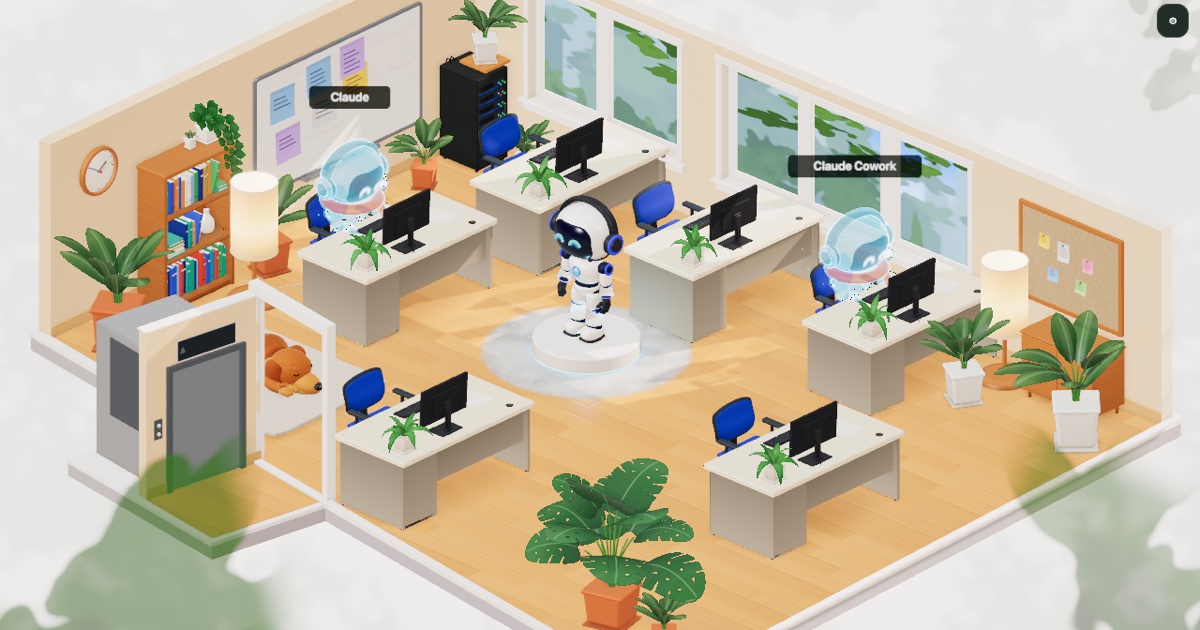
OffiAI (pronounced offi-AI; office + AI) is a free macOS app from Delicatino GmbH in Bremen. It shows each active AI coding session, from the Claude Code CLI, Claude Cowork or the Codex CLI, at its own desk in a 3D office.
The problem: many sessions, one narrow window
Working with Claude Code, it quickly becomes normal to run more than one session. One fixes a bug. One writes tests. One reads through an old module so you can ask it questions later. Each lives in its own terminal tab or tmux pane.
The work itself goes fine. Keeping track of it does not. Which tab was the bug fix? Is that one still thinking, or waiting for an answer from you? Did the test session finish an hour ago? To find out, you click through tabs and scroll back through output. Every check costs a little attention, and with enough sessions you stop checking. Then a session sits waiting for a yes from you for twenty minutes.
A terminal is good at showing one stream of text. It is not built to show you, at a glance, the state of several pieces of work at once.
The spatial answer: give the work a place
People solved this problem long before computers, with offices. You do not need to read anyone’s notes to know who is busy: you see them at their desk. So we gave the agents an office.
- Reception. New Claude Code work starts here. You describe the work and pick a folder, and OffiAI starts a session at its own desk.
- Desks. One session, one desk. Each desk has its own conversation, so sessions stay separate. A glance across the room tells you which ones are working.
- Holograms. There is one robot, but several tasks can run at once. When the robot is busy elsewhere, a hologram stays at the other desks and keeps working. A glowing desk means a session is working there or waiting for you.
- The elevator. For now it is scenery. Later it will take you to a colleague’s office.
The point is not decoration. The point is that “what is going on?” gets answered by looking, not by reading.
How it works under the hood
OffiAI is a macOS app. It does not run its own model. It shows the work of the agents you already use.
Claude Code: observed locally
The Claude Code CLI keeps a list of its sessions and a transcript of each one in its folder under ~/.claude. OffiAI reads those files on your Mac and follows along as they change. Each session gets a desk, and the robot shows the kind of work going on: reading, running a command, editing. You can also start a session from Reception in a folder you choose. Nothing has to be installed in the terminal. Setup for Claude Code.
Claude Cowork: a small bridge on your Mac
Cowork, in the Claude desktop app, was harder. A Cowork session’s plugin hooks and shell commands run in a cloud environment, not on your Mac, so they cannot reach OffiAI. One thing does run on the Mac: a tool server that the Claude app starts for a plugin, natively, for each session. Our plugin uses that. Its bridge tells OffiAI over the Mac’s own loopback address when a session starts and ends, and passes on the one-line progress notes Claude chooses to send. For tasks you start from OffiAI it also passes on a copy of Claude’s answer. It never sends files or transcripts. The plugin is out (0.4.0). How to install it.
Nothing goes to our servers
In both cases OffiAI only shows what happens on your Mac. Sessions, prompts and transcripts are not sent to us. There is no OffiAI server in the path.
What is next
OffiAI is in preview. Beta 29 is from 24 October; the Cowork plugin, the Codex hooks and early read-only Gemini support have shipped. You can already message a Claude Code session you started in your terminal from its desk while it is idle; next comes continuing a desk’s conversation in your terminal, then visits to a colleague’s office and the phone apps. We list what ships, with dates, in the changelog.
Update, 26 October 2026: beta 40 lets Reception start Codex and Gemini as well as Claude Code, and you reply to those sessions from their desks. Codex and Gemini sessions you start in your own terminal are still shown read-only. Details are in the changelog.
If you run several agents and lose track of them too, we would like to hear how you work. Join the preview, or write to preview@offiai.app.
Want to try it? Join the preview.