Remote access stays on after OffiAI restarts
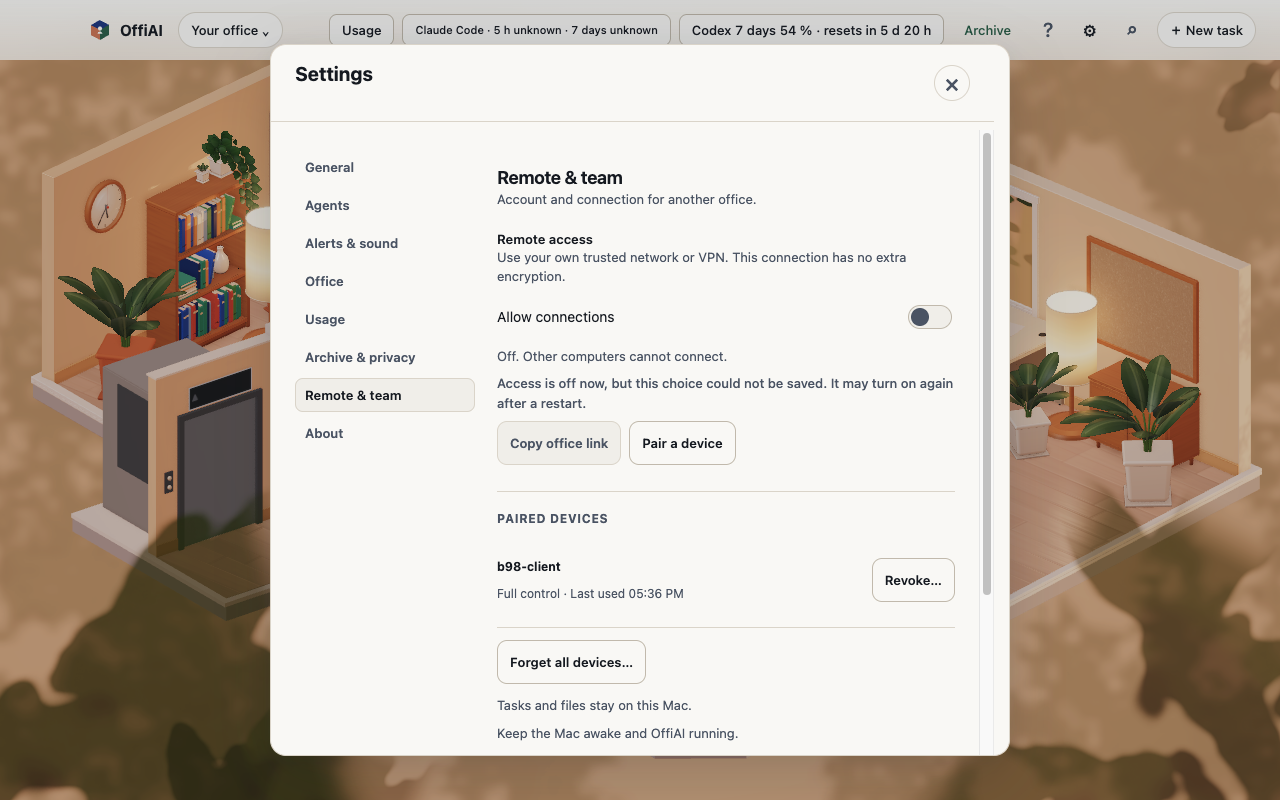
In beta 98, remote access stays on after OffiAI restarts. If you leave remote sharing on, it automatically resumes without requiring you to configure it again.
What changed
A saved On choice resumes after an app restart at the exact saved address and port. Your paired device’s existing token authenticates with no pairing code, reconfiguration, or selecting an interface, and shutdown never overwrites the saved choice.
If you choose Off, that choice is saved and stays off after a restart, while keeping your paired devices retained. An Off whose preferences write fails still closes access at once and is reported as unsaved, never claimed. Settings shows an unsaved Off warning in EN, ES, and DE through status refresh until a successful save.
Revoked and forgotten owner devices stay refused across automatic startups while visitor passes keep their separate authority and device removal never turns sharing off.
If a saved port is occupied at startup, automatic startup leaves the service failed on that address and port with no link or code, does not reject creating the service, and retries only that address and port.
How to use it
OffiAI preserves your selection across restarts, so you do not need to re-enable sharing each time the app opens. If you leave remote access on, your paired device reconnects automatically. If an Off choice fails to save, look in Settings, where the app shows an unsaved Off warning until a successful save.
What is not working yet
Our hand check of beta 98 found that a visitor window does not auto-recover after a host restart. It remains offline for three or more minutes until you trigger a manual reload, although the owner device recovers on its own.
We also found that the unsaved-Off warning stays muted grey. In addition, an open Settings panel keeps «Could not listen…» after automatic recovery.
Want to try it? Join the preview.
In pictures