Start a task on its own branch

The OffiAI team, Delicatino GmbH · · beta 38

Beta 38 lets you start a Claude Code task on its own branch, so agents working in parallel never collide. Your main checkout stays untouched while each agent works in its own working folder inside the repository.
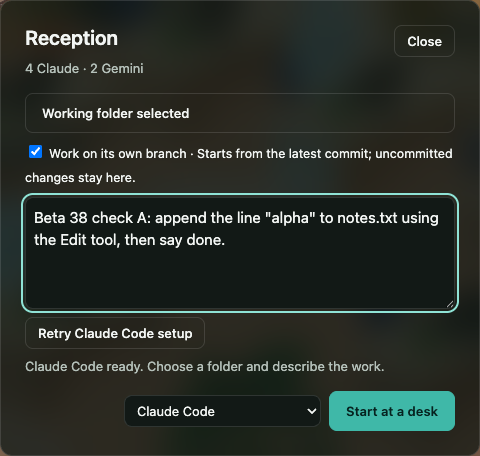
When you pick a Git repository in Reception, "Work on its own branch" is switched on before you start. The new task begins from the latest commit, and your uncommitted changes stay where they are.

How it works

When the folder you pick at Reception is a Git repository, the dialog shows a switch labeled “Work on its own branch”, turned on by default. Switch it off before clicking Start if you prefer to work in the shared folder as before. Ordinary folders keep the shared flow.

Two tasks in the same repository get two separate branches and working folders. Neither agent sees the other’s edits.

Where to look

The desk and its hover label show the branch. The Talk drawer notes which desks share a repository.

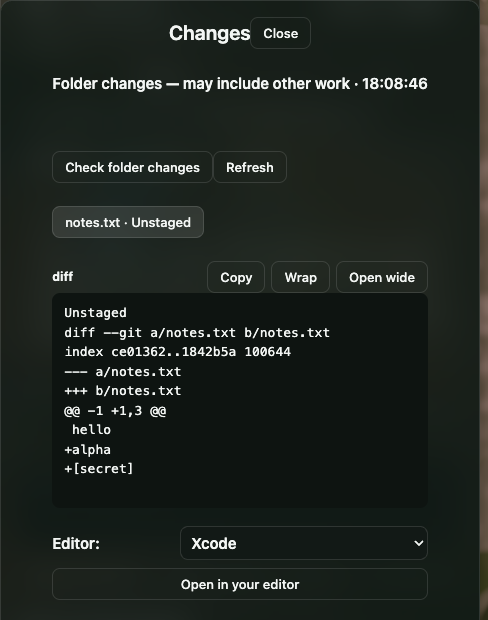
The Changes view works inside these working folders.

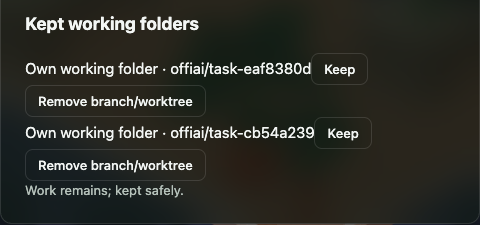
When you are done, the working folder is kept. The Talk drawer lists it under “Kept working folders”, where you can choose Keep to keep it or Remove to remove it. Remove works only when nothing would be lost; otherwise the app says “Work remains; kept safely.” After a removal it says “Branch and working folder removed.”

Current limits

One honest limit is that own-branch starts are currently only for Claude Code tasks. Codex and Gemini are not started from Reception yet.

In pictures
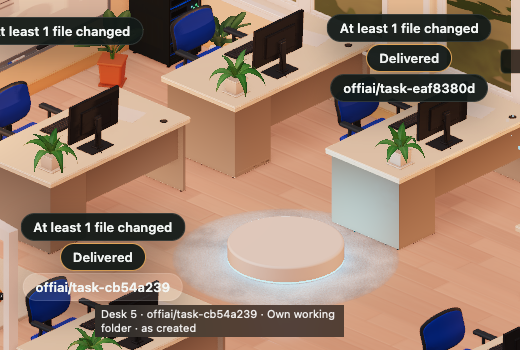
Two tasks in the same repository, each on its own branch. Every desk shows its branch, and hovering it says the desk works in its own folder.
Finished tasks leave their working folders under "Kept working folders". You choose Keep or Remove. OffiAI refuses to remove a folder that still has work in it.
Changes reads the task's own folder. In the diff, only the line that looks like a secret is replaced with "[secret]". The lines around it stay readable.

Want to try it? Join the preview.

More