
Beta 52: start tasks without choosing a folder every time
Starting a task in OffiAI no longer opens a folder chooser by itself. You can now save a default folder for new tasks or let each task run in its own temporary folder.
How to set a default folder
Go to Settings › Office to find the Default task folder setting. Click Change… to pick a folder on your Mac, or click Clear default to remove it. When no default is set, the row reads: No default · private temporary folder for each task.
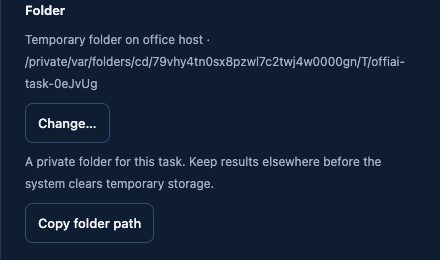
Without a default, each task gets its own private temporary folder on the office Mac. The folder is kept after the task finishes, is never deleted automatically, and is reused when you retry the task.
Reception and task overrides
Reception shows the folder for each task alongside Change… and Copy folder path. Choosing another folder for a single task does not change your default setting. The saved default persists on the office host for new tasks, and individual task choices do not change it.
If a saved default folder is unavailable, your draft is kept so you can choose another folder or use a temporary folder. When you use the optional Choose a folder on Mac chooser, the list scrolls within the window on desktop and phone while Choose this folder and Cancel stay visible.
Known limitation
In beta 52, clicking Copy folder path does not copy the path to your clipboard yet. Instead, the app answers: Could not copy. Select and copy the folder path above.
Want to try it? Join the preview.