
Beta 53: Desk controls and clean desk starts
OffiAI beta 53 makes desk actions reliable and prevents failed launches from taking over occupied desks. You get working Stop, Release, and Terminal actions across your office.
Cleaner starts in Reception
When you start at a desk and setup fails, the failed work now stays in Reception. It will not move or displace another conversation at an occupied desk.
You can look in Reception to see the actual cause of the failure. The app reports specific details, such as unreadable session records, another instance owning the office, or records requiring a newer version. To try again, click the existing retry control.
Stop and Release controls
You can now stop and clear desks without controls becoming unresponsive.
To stop an active session, click “Stop” on its desk. A confirmation dialog asks, “Stop this session? Your files will be kept.” Once you confirm, the session stops.
To clear an idle desk, click “Release idle desk.” The prompt asks, “Release this desk? Its folder and conversation history will be kept. An idle process will be stopped.” You then select “Release” or “Keep.” Desks marked as Done release in a single click, and stuck problem desks can now be cleared cleanly with truthful recovery details.
Terminal commands
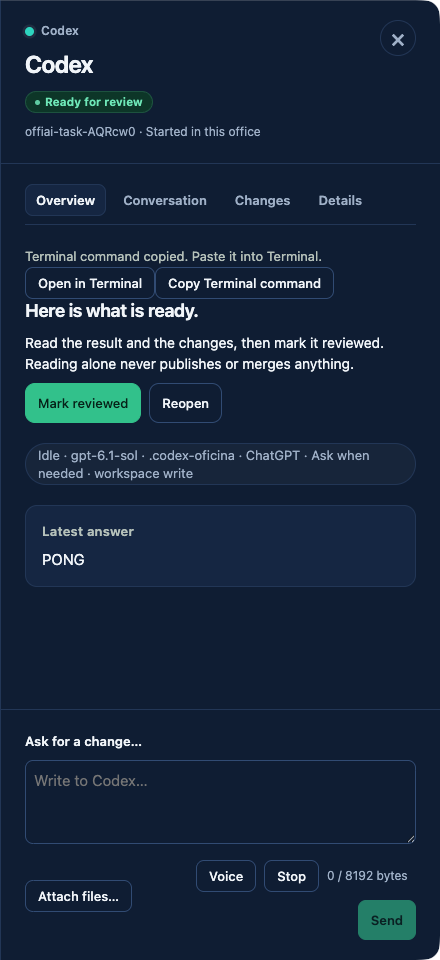
Attachable owned desks keep their Terminal options visible. You can click “Open in Terminal” or “Copy Terminal command” on any attachable owned desk when you need direct shell access. Closed or revoked remote windows also stay closed instead of reappearing.
Current limitations
Terminal commands do not support remote desks. “Copy Terminal command” and “Open in Terminal” only appear on locally owned, attachable tmux desks. If remote access is revoked, the connection will not restore itself, and you must pair the device again.
Want to try it? Join the preview.