
Trust and start now tells you when Terminal is in the way
In beta 84, the Trust and start button on a Codex or Gemini desk either starts the desk or tells you what to do first.
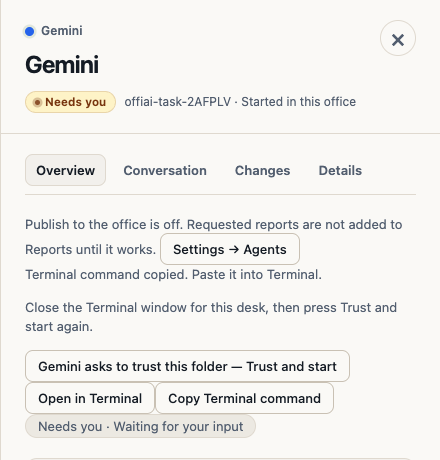
What changed
Before this beta, clicking Trust and start on a Gemini desk sometimes did nothing: the trust question came back, and you had to trust the folder in Terminal by hand.
The reason was a key-safety rule. OffiAI never sends keys to a desk while a person’s Terminal window is attached to it. It kept that rule but did not tell you.
Now, when a Terminal window is attached to that desk, the desk tells you before you click: “Close the Terminal window for this desk, then press Trust and start again.” OffiAI still sends no keys while that window is attached. Codex and Gemini desks behave the same way.
How to use it
If you see that message, close the Terminal window for this desk, then press Trust and start again. OffiAI trusts the folder and starts the desk. If no Terminal window is attached, Trust and start starts the desk directly.
Honest limit
The desk cannot start while its Terminal window is attached. You close that window yourself first.
Want to try it? Join the preview.