
OffiAI: a Claude Code dashboard with a 3D office view
If you are looking for a Claude Code dashboard, this is what ours shows: which session is working, which one waits for your permission, which files it edited, and every session it has seen, searchable. OffiAI is a separate, proprietary Mac app made by Delicatino GmbH, not by Anthropic. It is free in the current preview and sits next to the Claude Code CLI you already use: Claude Code still does the work, with your own sign-in and subscription. Below we follow one small task from the brief to a reviewed result.
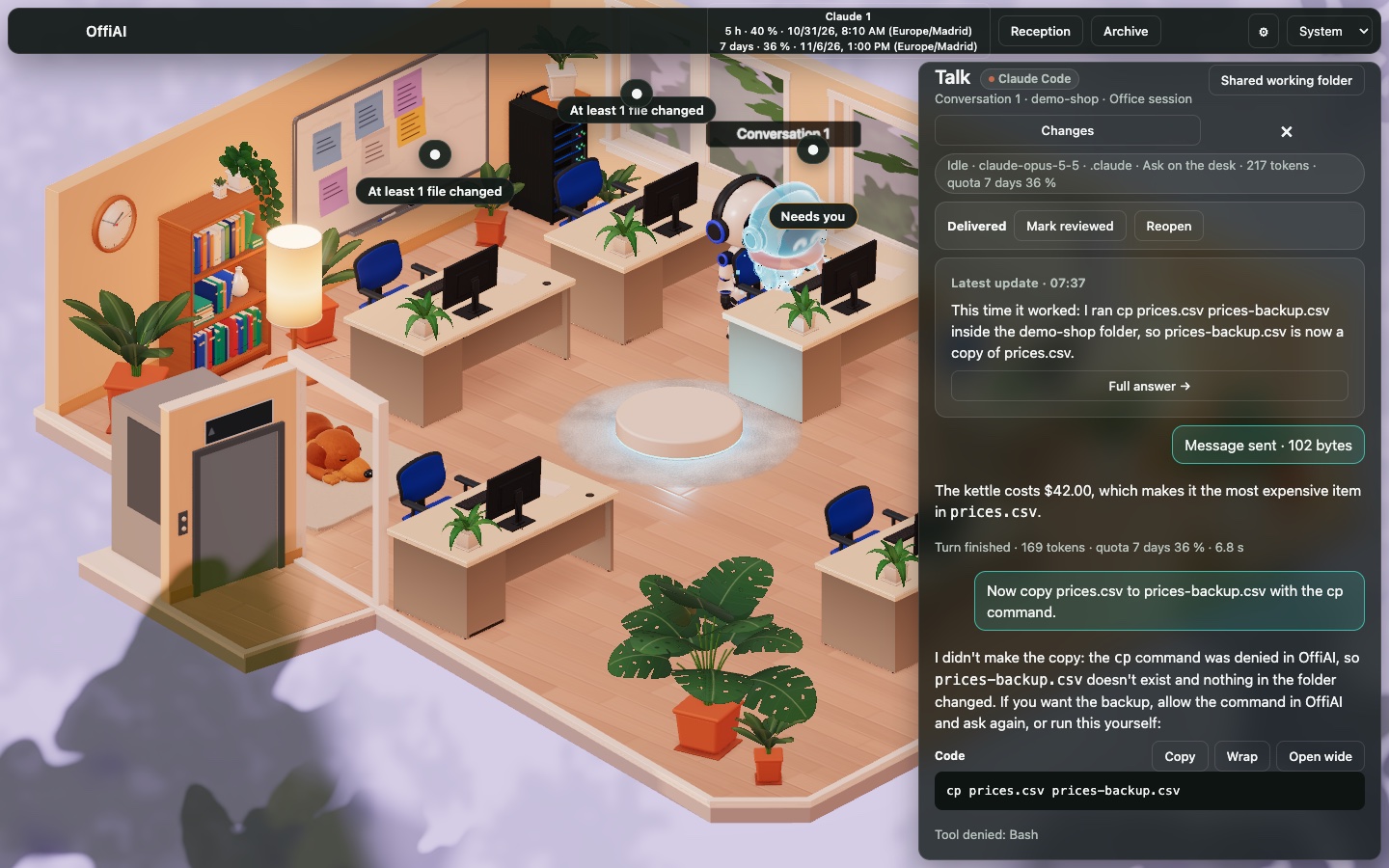
Terms used below: a desk is one session, and the Talk drawer in its panel holds the conversation. Reception is the round pad where you start work. Needs you and Delivered are the chips for “waiting for your answer” and “turn finished”.
What the Claude Code dashboard shows
OffiAI follows the session files Claude Code writes on your Mac, so seeing sessions needs no plugin or hook, and terminal sessions show up next to the ones you start in OffiAI. The hero picture above has all four signals:
- State. A desk turns busy while Claude Code thinks, reads, runs a command or edits, and goes idle when the turn ends.
- Attention. The desk on the right waits for a permission answer, so it shows “Needs you”.
- Identity. The panel heading names the agent (“Claude Code”), the folder (demo-shop) and, in the status line, the model.
- File changes. Two desks say “At least 1 file changed”; “at least” because OffiAI may not have seen every edit.
An office has a limited number of desks: six in the standard office, at most 12. The preview has every desk; planned plans may change these counts. What happens when every desk is held is covered in How to see all Claude Code sessions at once. The pictures here show the classic office, the default; the new interface shows the same states as desk cards.
Start a task and continue its conversation
At Reception you write the task and press “Start at a desk”. Unless you have set a default task folder, each task gets its own temporary folder; “Change…” points it at a project instead. Reception also lists the Claude Code version it found, the model, and the task’s permission mode, which was “Ask on the desk” in our fresh profile. Claude Code then starts in that folder at a free desk, and the desk’s panel opens.
We gave three demo tasks: fix a typo in a README, name the most expensive item in a small price list, and create an empty file. Follow-ups go from the drawer into the same session; “New conversation” starts over at that desk, and Stop halts the current turn at this desk alone. Our follow-up to the price-list desk was “copy prices.csv to prices-backup.csv”.
Answer a permission request
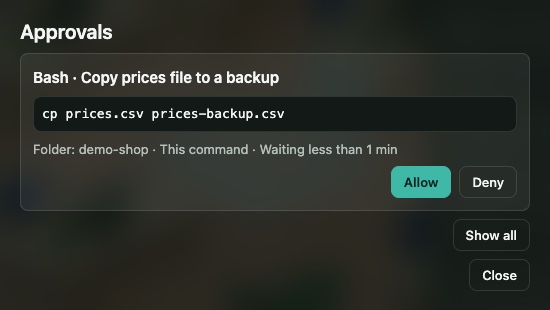
Because that task was started from OffiAI, Claude Code’s permission request came to OffiAI rather than to a terminal. The drawer showed “Permission requested: Bash” and “Review and approve”, which opens Approvals: tool, description, the command exactly as Claude Code wants to run it, the folder and how long the request has waited, then Allow or Deny. Anything shaped like a credential, such as a key or token, would appear as “[secret]”.
The first attempt used long absolute paths, so we pressed Deny; Claude Code answered that the copy had been denied in OffiAI and that nothing had changed. On the second attempt it proposed cp prices.csv prices-backup.csv, and we allowed it. OffiAI adds no questions of its own: you see a request only where Claude Code would have asked.
Sessions you start in a terminal keep asking in the terminal. The optional, off-by-default setting “Approve terminal sessions in OffiAI” routes their Bash questions to OffiAI as well; it adds a hook entry to Claude Code’s settings only after showing it to you, and Settings checks your Claude Code version first. Approvals you can answer from one place covers its scope.
Inspect changed files before marking work done
When the typo task finished, its desk said “Delivered”. That is the agent’s side of the job. Your side is the row in the drawer: “Mark reviewed”, then “Mark done”, or “Reopen”. Until you mark it done, the job keeps its desk; after that, the desk is freed once the time set under “Free done desks after” in Settings has passed.
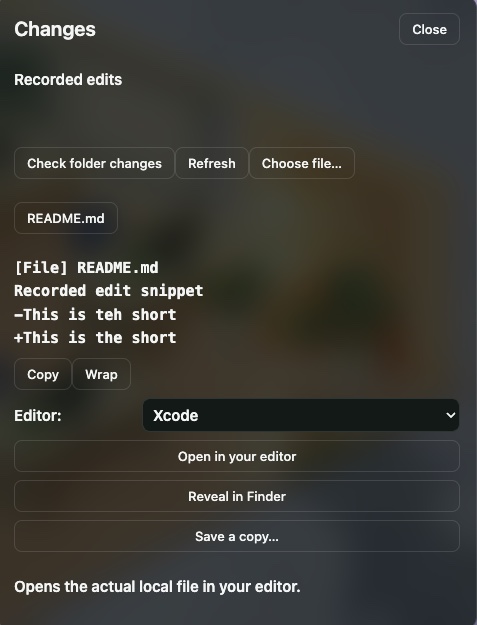
Before deciding, we opened “Changes”. It lists the files the session edited, taken from Claude Code’s own record of each edit, and selecting README.md showed the change: “teh” out, “the” in. Previews are short, and a line containing something shaped like a credential shows as “[secret]”. “Open in your editor” hands the real file to an editor found on your Mac, and “Check folder changes” shows the folder’s current state without saying which agent caused it. More in See what each agent changed, and open it in your editor.
Search sessions and choose alerts
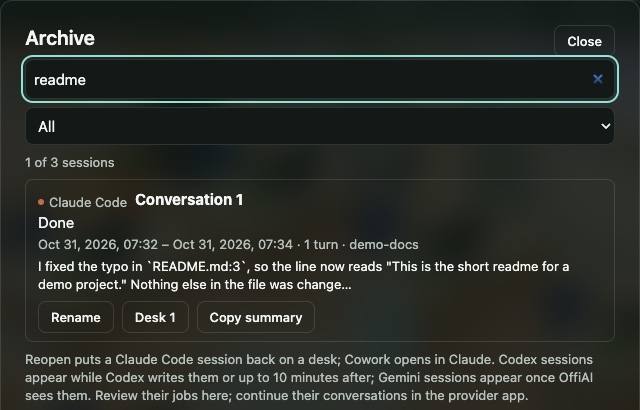
When you need a session again, “Archive” in the top bar finds it. Typing “readme” narrowed our three demo sessions to one, matched by the excerpt of its last answer; titles, agents and folder labels are searched too, but not full transcripts. State filters (Working, Delivered, Reviewed, Done) narrow the list further. The archive holds sessions from the time OffiAI was watching, not earlier ones; Why every agent session should be searchable explains it.
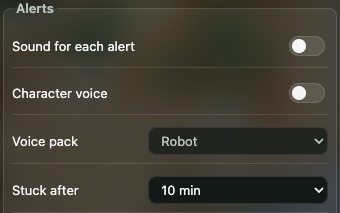
For times you are not looking at the office, alerts cover three events: a finished turn, a desk that needs you, and a stuck desk (failed, or no progress for the “Stuck after” time, 10 minutes by default). Only the in-app “Delivered” chip is on from the start. The macOS notification is a switch in Settings, “macOS notifications (finished, needs you, stuck)”, and sounds and voices are under Alerts. A notification never marks anything reviewed or done.
Set it up on a supported Mac
- A Mac with Apple silicon; OffiAI is a free public preview, and the changelog lists every build.
- Claude Code installed and signed in. To see sessions you need 2.1.272 or newer, below 2.2; to start or continue work from OffiAI, 2.1.302 or newer. Claude Code 2.2 is not supported yet;
claude --versiontells you what you have. - The notarised build from the release page, moved to Applications. Details are in the Claude Code setup guide.
OffiAI reads Claude Code’s files locally and has no server that would receive your sessions; see our data statement. For Codex, Claude Cowork and Gemini desks in the same office, read How to manage multiple coding agents on your Mac.
In pictures
Want to try it? Join the preview.